Admin Settings
Path: /admin
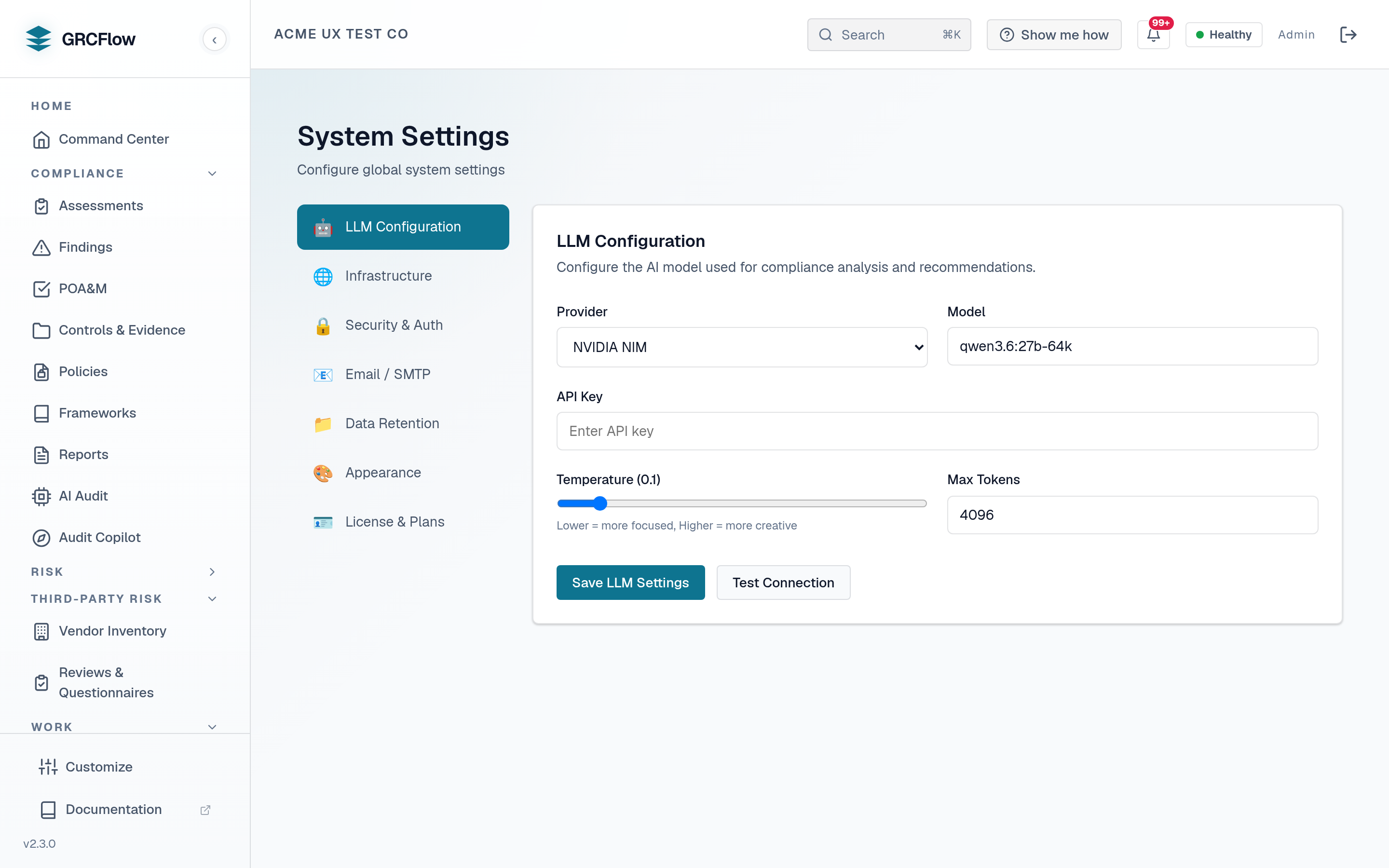
Advanced system configuration for administrators.
Configuration Sections
- Password Policy - Minimum length, complexity requirements, expiration.
- Security Settings - Session timeout, MFA enforcement, IP restrictions.
- UI Settings - Theme, default page, items per page.
- Data Retention - How long to keep audit logs, findings, and evidence.
- LLM Configuration - Configure the AI model provider from the UI (details below).
- SMTP Settings - SMTP values stored in the database, with a connection test. Note that outbound mail is selected from the environment, not from this tab - see Email configuration for the variables that actually drive delivery, the port/TLS combinations, and how to tell from the logs whether a message was sent or only logged.
- Backup Settings - Database backup schedule and retention.
- License - View the current entitlement, and activate or update a license key without reinstalling (details below).
- Database Reset - Emergency reset with optional reseed (use with caution).
License
The License tab shows what this installation is actually entitled to right
now - status, plan/tier, organization, seats, deployment mode, and expiry - as
reported by the license service (the license-exempt GET /api/v1/setup/deployment-info
endpoint, so it works even when unlicensed).
Activate or update a license
Paste a signed license key into Activate or update license and click
Activate / update license. The key is verified locally against the vendor
Ed25519 public key that ships with the product (no internet required) via
POST /api/v1/setup/license, then persisted to /etc/sovereign-grc/license.key
(the license_data volume). The new entitlement takes effect immediately and the
status panel refreshes.
Use this to:
- Apply a paid key you were issued - a seat-tier key, or a legacy employee-band or Professional / Enterprise key. The setup wizard's key field is only reachable during first-run, so this tab is where post-install keys go.
- Renew before or after expiry. An expired install still lets you reach the
License tab and paste a new key - login, setup, and the health check stay
available even when GRC endpoints return
403 license_required.
A key is not optional. GRCFlow is trial-then-buy: with no key activated the
install is unlicensed and every business endpoint returns 403
license_required. Every edition ships the same binaries and differs only in
seats, term, and deployment mode; each plan row on the tab names the exact
backend gate that enforces it. Seat limits are enforced install-wide at user
creation and invitation.
The free 30-day trial is how you open a fresh install: 30 days, 5 seats, 1 organization, the full platform and all 20 frameworks. It is a real Ed25519-signed key, requested from the form at defendflow.xyz, rate-limited to one per email address per 24 hours and shown on the page rather than emailed. No credit card is taken, so it cannot convert into a paid plan and nothing auto-renews - when it expires the API returns 403 and you decide whether to buy.
Paid keys are priced by seats - named users, not employee headcount - and are a 1-year license, prepaid, issued as an Ed25519-signed term. Every tier ships the same binaries, all 20 frameworks and the full platform; the tiers differ only in seat ceiling. Pricing is by seat, quoted on request - start with the free trial or contact sales@defendflow.xyz:
| Tier | Seats | Pricing | How to buy |
|---|---|---|---|
| Flow25 | Up to 25 | Quoted | Prepaid annual |
| Flow50 | Up to 50 | Quoted | Prepaid annual |
| Flow100 | Up to 100 | Quoted | Prepaid annual |
| Flow200 | Up to 200 | Quoted | Prepaid annual |
| Enterprise (201–500) | 201–500 | Quoted | Quote / invoice |
| Enterprise (500+) | 500+ | Quoted | Quote / invoice |
Air-gapped deployment is not a separate SKU or priced tier: it is a deployment option available on any plan, sold by quote and invoice.
The tier's seat number is the ceiling signed into the key: Flow25 25, Flow50
50, Flow100 100, Flow200 200, and the Enterprise bands sized to your
organization. It is the
only difference between tiers that anything enforces - they all carry
identical entitlements and no feature is gated between them. The Seats row on
this tab shows that ceiling, because it is what require_seats_available actually
checks at invite and user creation. Size the tier to cover your members plus the
auditors, contractors and service accounts you invite.
Seats are counted locally, in the product, against the ceiling in your license claim - an air-gapped install never phones home, so nothing here counts your headcount. On the four Flow tiers, inviting or creating a user past the ceiling is refused until you free a seat or move up a tier; the Enterprise bands carry a ceiling sized to your organization.
Keys issued under the retired plans - the earlier Starter / Team / Business seat tiers, the employee-size bands, and the per-seat Professional (25 seats) and Enterprise (100 seats) plans - stay valid to their expiry and are enforced and displayed on their original seats; a claim carrying a legacy band keeps that band's terms.
There is no auto-renew and no card kept on
file: when the year is up you buy a new key and paste it here. Validation is entirely offline -
the backend checks the signature against the vendor public key that ships in the
deployment files (LICENSE_PUBLIC_KEY_HEX in deploy/public/.env.example and as
the docker-compose default), so there is nothing for you to obtain or generate.
See Offline & air-gapped activation for air-gapped hosts
and the clock-rollback check.
LLM Configuration
The LLM Configuration tab drives the platform's AI runtime directly - saved
settings are stored in the database, override the LLM_PROVIDER environment
configuration, and apply live with no backend restart.
- Provider - dropdown selection. Providers with a runtime client in this
build:
- NVIDIA NIM - hosted models via integrate.api.nvidia.com.
- Local / Self-hosted (Ollama/vLLM) - enter the Base URL of your
server's OpenAI-compatible endpoint (e.g.
http://localhost:11434/v1for Ollama). Private and localhost addresses are allowed. - OpenAI and Azure OpenAI - served through the same OpenAI-compatible client (Azure shows a Base URL field for your resource endpoint).
- Anthropic Claude - native Messages API client.
- Google Gemini and DeepSeek - served over their OpenAI-compatible endpoints.
- Cloudflare Workers AI - hosted inference via the Workers AI client.
- Model - a curated per-provider list plus a Custom model… free-text option, so a stale list never blocks you from a newer model id.
- API Key - stored encrypted at rest; once saved it is shown masked and never echoed back to the browser.
- Test Connection - probes the endpoint you configured
(
POST /api/v1/system/settings/llm/test) and reports success or the exact failure, so you can validate before running an assessment.
Running a reasoning model? Set LLM_REASONING_EFFORT=none
Reasoning models - Qwen3, DeepSeek-R1, kimi-k2.5 and similar - think before they answer, and the thinking is billed against the same token budget as the reply. A model given too little room spends the whole budget reasoning and returns an empty answer, or one that stops mid-word.
GRCFlow handles this automatically: it detects the pattern, retries with the
thinking switched off and a larger budget, then remembers for the rest of
the process. You do not have to configure anything. But the first
generation in each worker process still pays for the probe, so if you
already know your model reasons, set LLM_REASONING_EFFORT=none and skip
it. Measured against a 27B reasoning model over Ollama: ~25s of discarded
thinking saved on the first call, and the same request answering in ~9s
instead of ~35s.
LLM_RETRY_MIN_TOKENS (default 4096) is the floor for the retry's budget.
Lower it only for a short-context model; your context window must
comfortably exceed the prompt plus this budget.
Anthropic, Gemini, DeepSeek and Workers AI need a key to take effect
Anthropic Claude, Google Gemini, DeepSeek and Cloudflare
Workers AI all have real runtime clients in this build
(AnthropicClient, GeminiClient, DeepSeekClient and WorkersAIClient
in src/backend/llm/client.py), and the admin-panel value routes to them
through _PROVIDER_MODE_MAP.
One deliberate guard applies: selecting Anthropic, Gemini or DeepSeek only
takes effect once a usable API key exists - either saved in the panel or
present in the environment. Without a key the saved provider is ignored and
the environment-configured provider stays authoritative, so a keyless
selection can never silently break AI features. SystemSettings.llm_provider
has always defaulted to anthropic, and this guard is what stops
long-lived installs that never configured a key from switching provider on
upgrade. See Bring Your Own Model.